# Schedule Unstake

### Understanding the terms in the display

Before unstaking, it is important to get acquainted and be familiar with the terms used in the Unstake page.

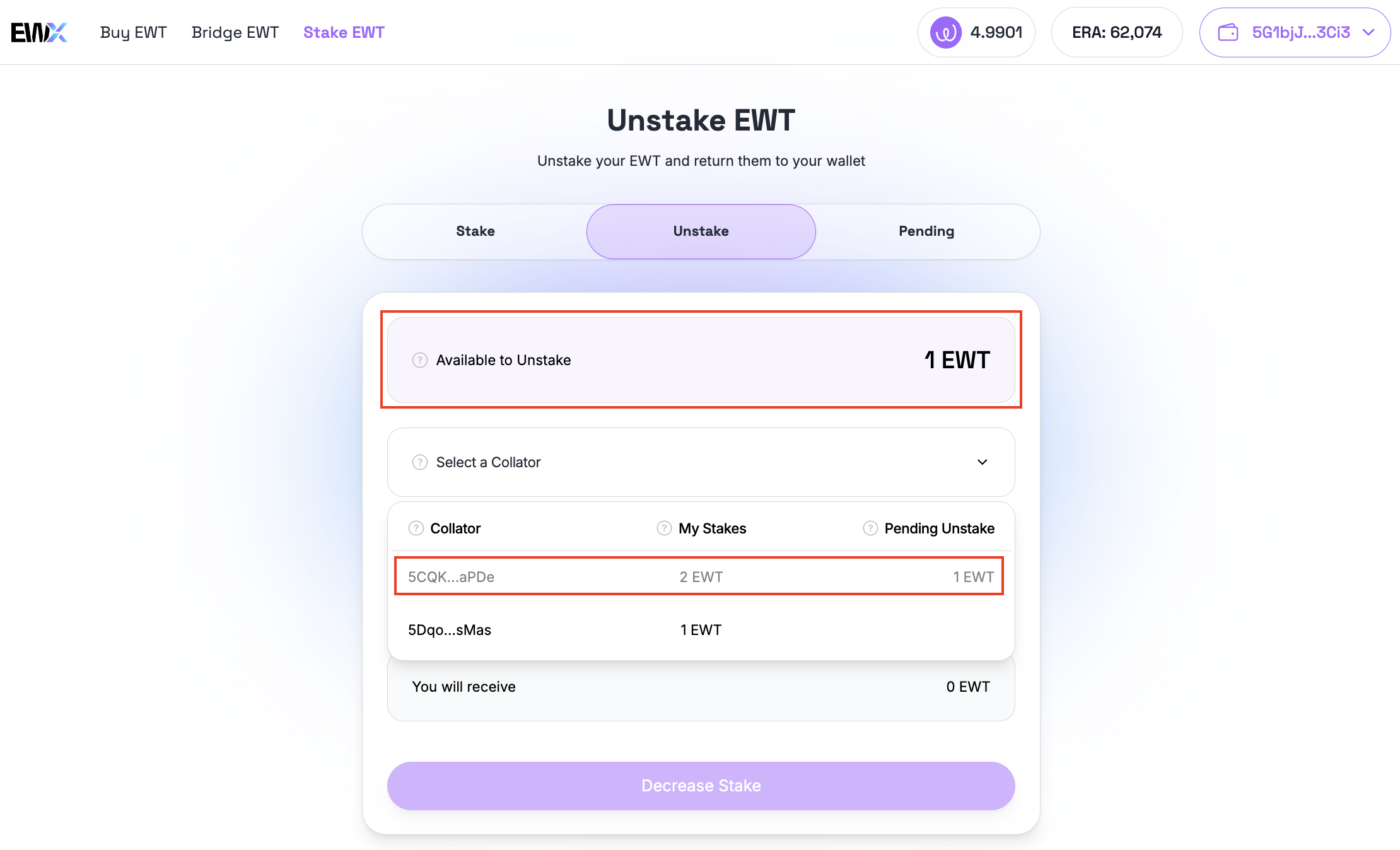
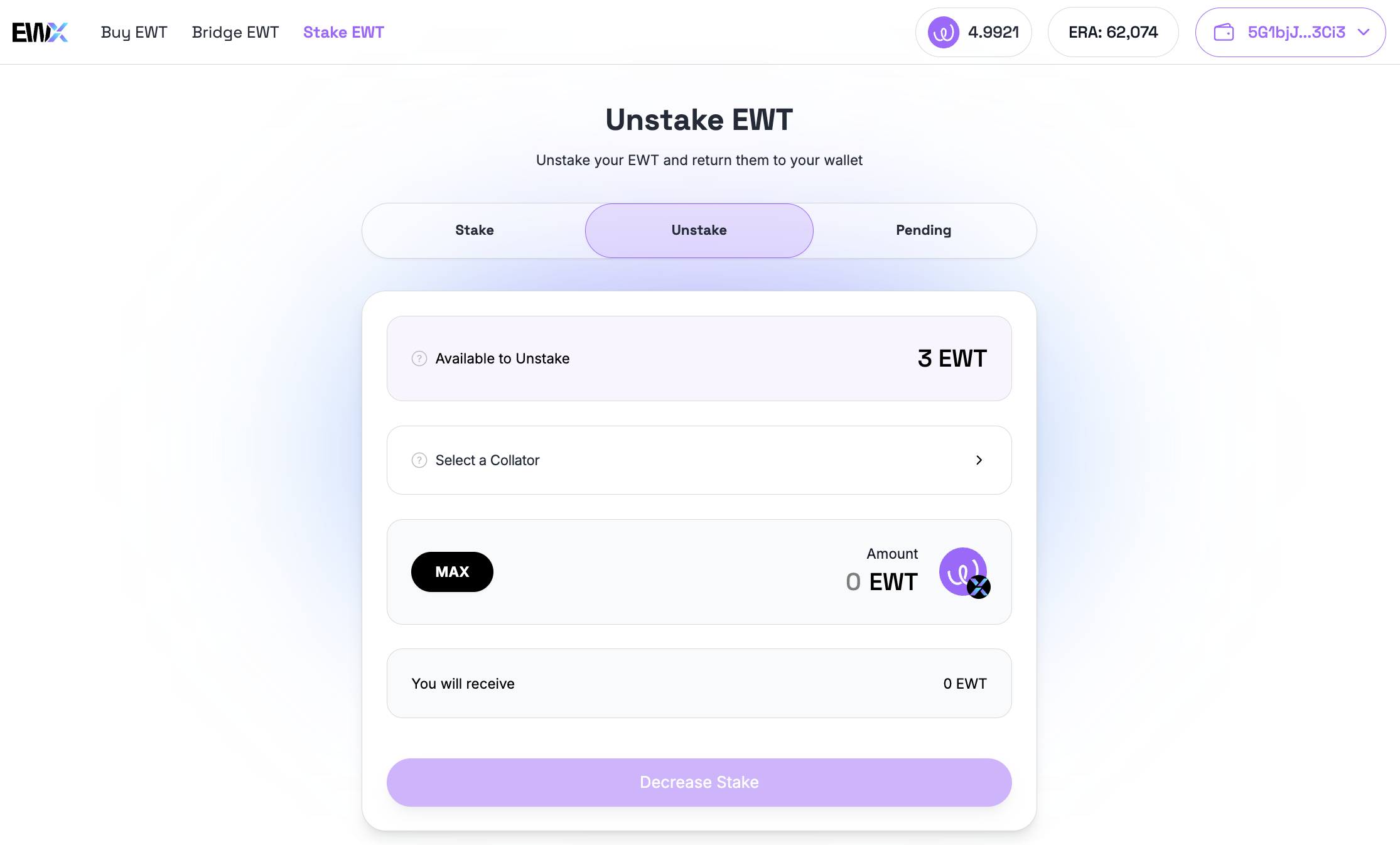
* **Available to Unstake** - The amount of $EWT that can be unstaked from your stakes without pending unstakes.
* **Collator** - Nodes that maintain the EWX parachain by producing block candidates and submit them for validation.
* **My Stakes** - The amount of $EWT you have currently staked with your chosen collator(s).
* **Pending Unstake** - $EWT currently in the unstaking process. After the cooldown, you’ll be able to claim it from the Pending tab.
* **Transaction Cost** - Network fee required to process the staking transaction.

### Schedule Unstake

To decrease stakes, simply navigate to the "Unstake" tab.

<figure><img src="https://4257445316-files.gitbook.io/~/files/v0/b/gitbook-x-prod.appspot.com/o/spaces%2Fnf3YeoQlQerc93GsC2Me%2Fuploads%2FcXGv3BKKCTC6ya9bMdHs%2Fimage.png?alt=media&#x26;token=7630d07c-3de9-4c6e-9ce5-9526b5eb0925" alt=""><figcaption><p>The Unstake tab</p></figcaption></figure>

Select a collator that has an active stake and doesn't have any pending unstake.

<figure><img src="https://4257445316-files.gitbook.io/~/files/v0/b/gitbook-x-prod.appspot.com/o/spaces%2Fnf3YeoQlQerc93GsC2Me%2Fuploads%2Ftb78tSoNxMQQM5pdBh8M%2Fimage.png?alt=media&#x26;token=d34fd9eb-cb70-4a9b-8b96-bcee1714c486" alt=""><figcaption><p>Choose a collator to unstake</p></figcaption></figure>

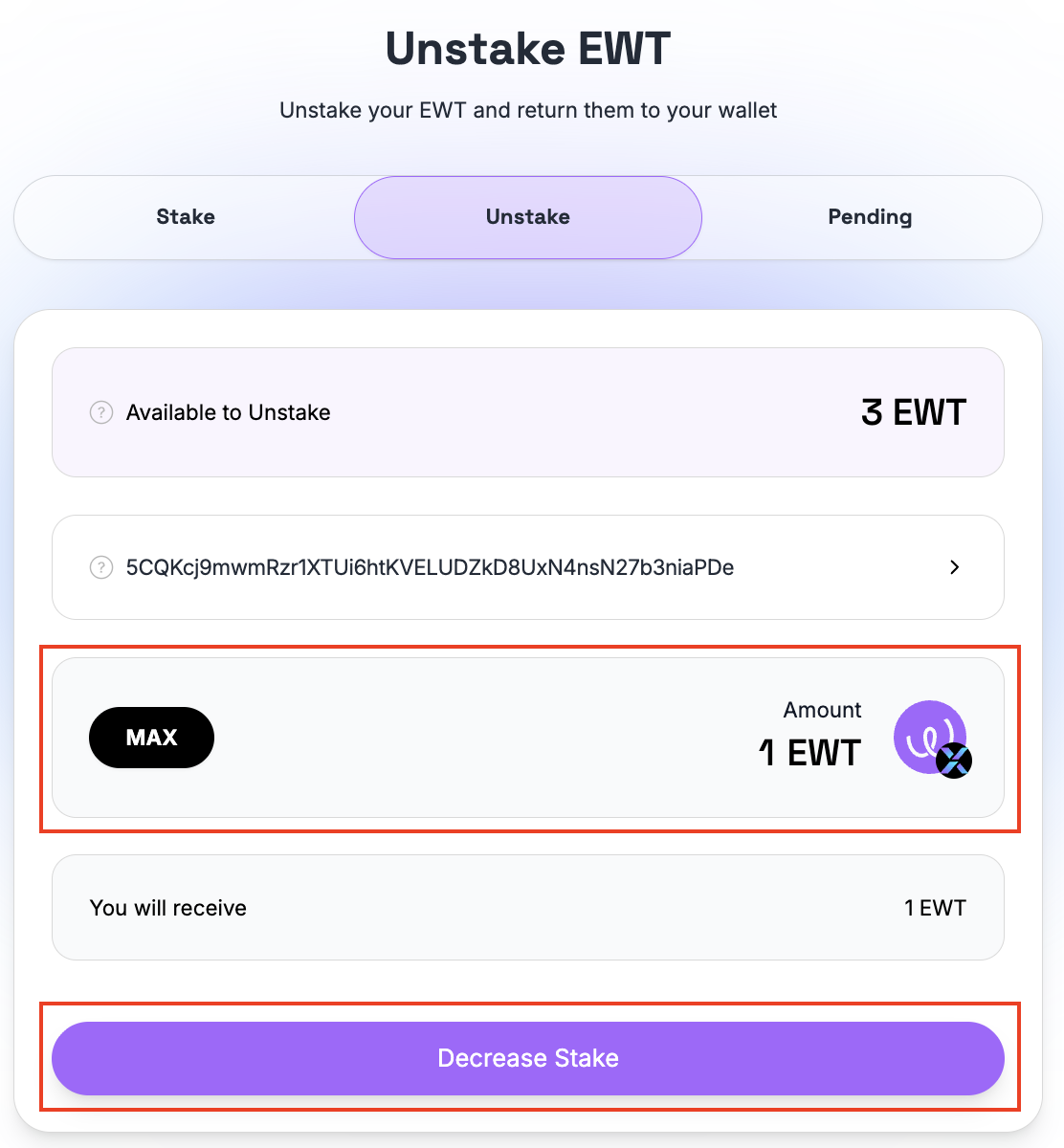
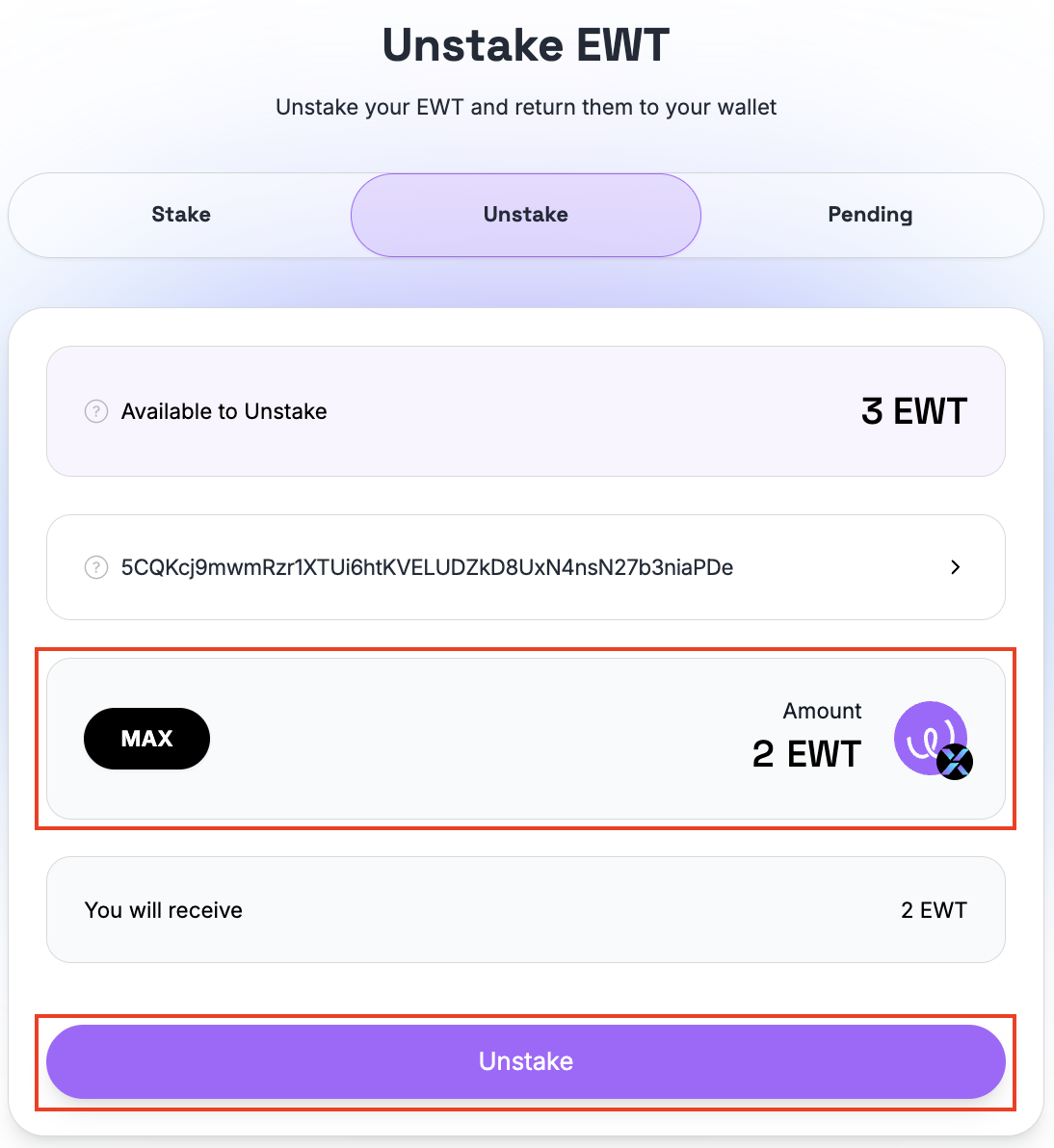
Input amount to unstake. Then, click the "Decrease Stake" or "Unstake" button to continue.

{% hint style="info" %}
To decrease stakes, simply input a portion of your current active stakes in a particular collator to be unstaked.
{% endhint %}

{% hint style="warning" %}
Setting the max value equal to the total active stake will fully unstake you from the collator. Once this transaction have "Ready to Claim" status in the Pending tab, the stake will stop earning rewards.
{% endhint %}

{% columns %}
{% column %}
**Decrease Stake**

<figure><img src="https://4257445316-files.gitbook.io/~/files/v0/b/gitbook-x-prod.appspot.com/o/spaces%2Fnf3YeoQlQerc93GsC2Me%2Fuploads%2F7F6EKJ5hZfZKCTVA3RKw%2Fimage.png?alt=media&#x26;token=0e50e287-c978-434d-bb29-7bd7e314de2e" alt=""><figcaption><p>Decrease Stake</p></figcaption></figure>
{% endcolumn %}

{% column %}
**Fully Unstake**

<figure><img src="https://4257445316-files.gitbook.io/~/files/v0/b/gitbook-x-prod.appspot.com/o/spaces%2Fnf3YeoQlQerc93GsC2Me%2Fuploads%2FUAj0dTUduW6TO2y7yujL%2Fimage.png?alt=media&#x26;token=19f9bf84-8334-4401-9b98-869be0174de6" alt=""><figcaption><p>Fully Unstake</p></figcaption></figure>
{% endcolumn %}
{% endcolumns %}

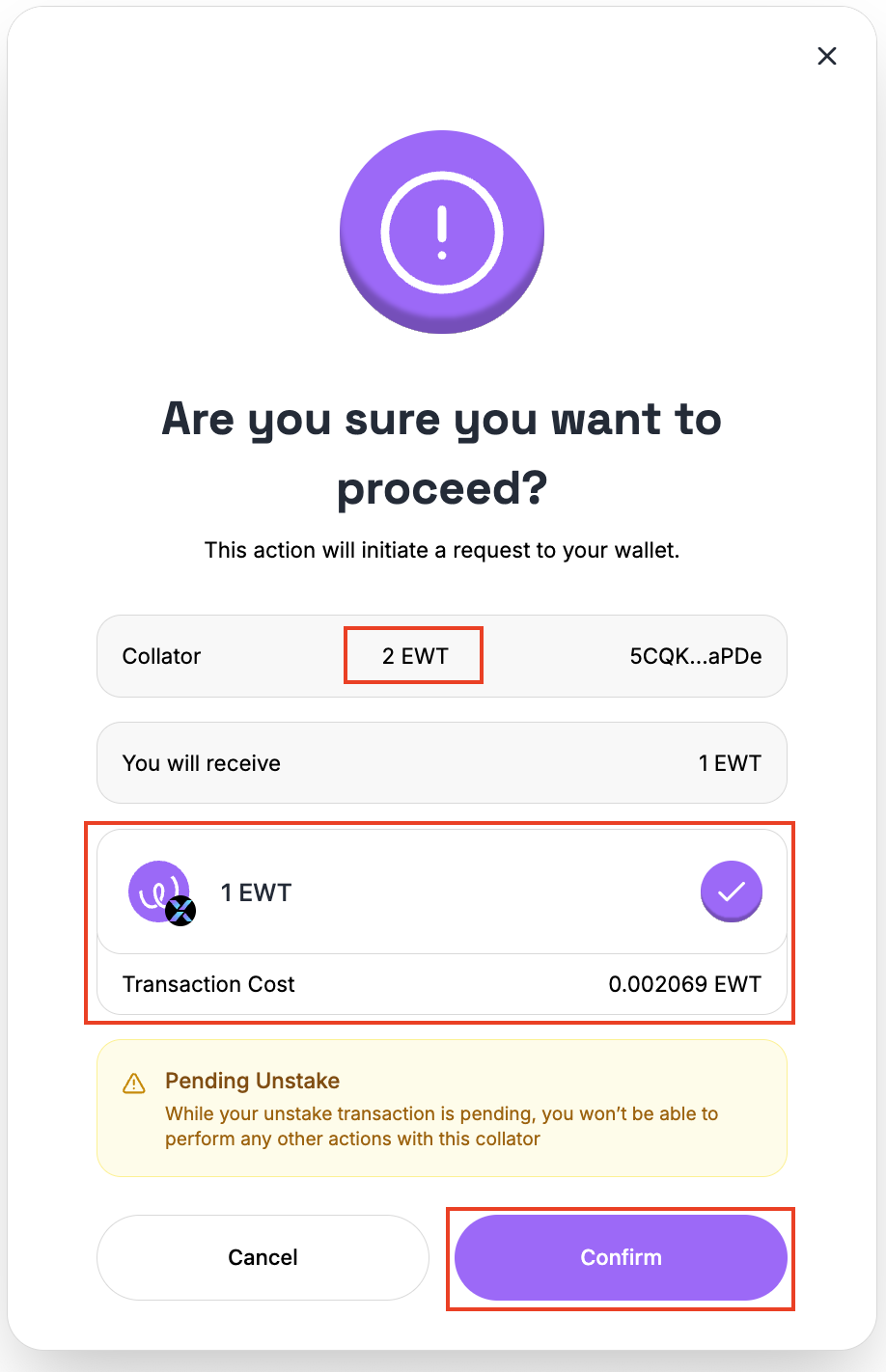
&#x20;A confirmation screen will be displayed. Review the details as displayed and ensure that the checkbox is ticked. Click the "Confirm" button to initiate the transaction.

<figure><img src="https://4257445316-files.gitbook.io/~/files/v0/b/gitbook-x-prod.appspot.com/o/spaces%2Fnf3YeoQlQerc93GsC2Me%2Fuploads%2FvYwFMjRaI6zJnO5hE7qy%2Fimage.png?alt=media&#x26;token=0213a6ea-57f6-47bb-8145-9e7f71851dfa" alt="" width="375"><figcaption><p>Decrease stake confirmation dialog</p></figcaption></figure>

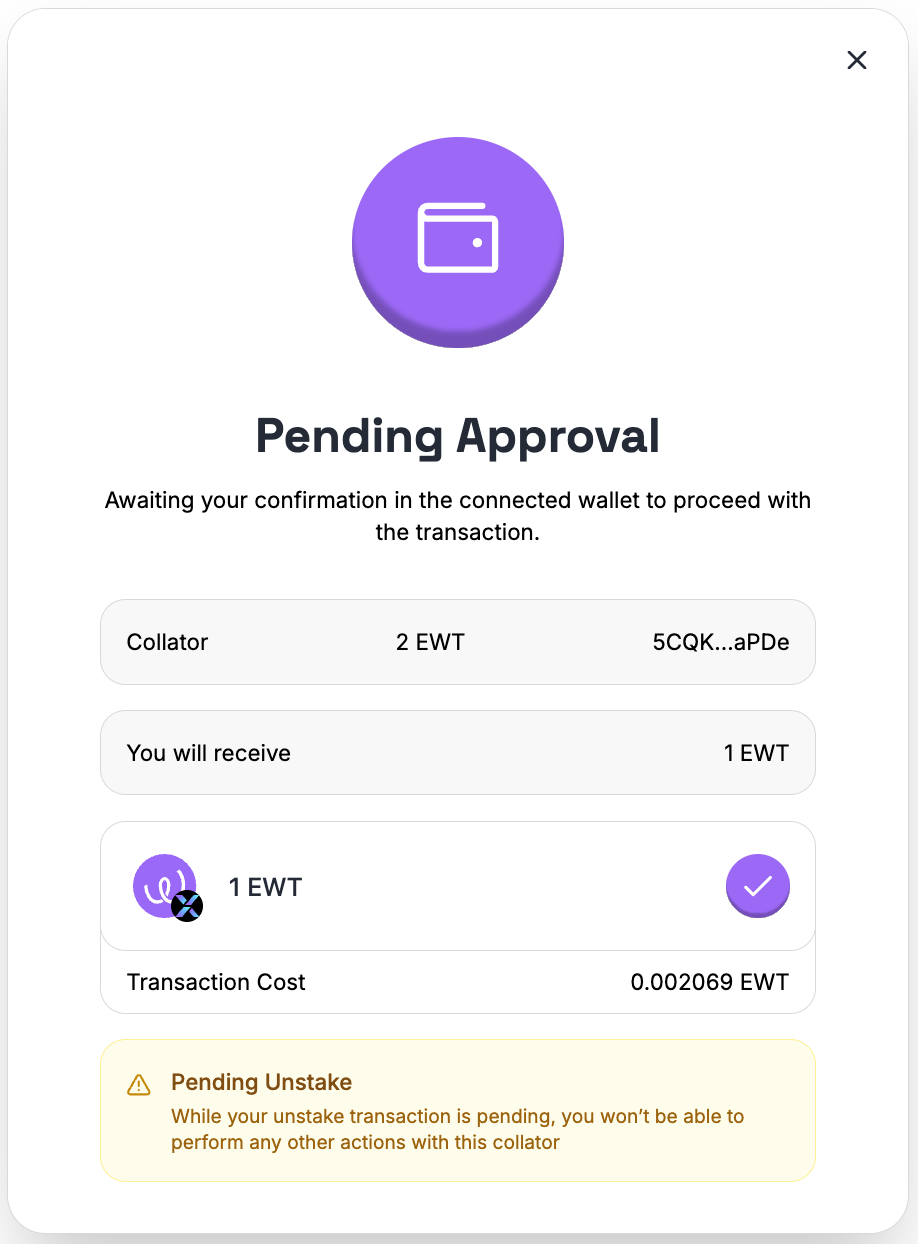
Confirm the transaction in your wallet.

<figure><img src="https://4257445316-files.gitbook.io/~/files/v0/b/gitbook-x-prod.appspot.com/o/spaces%2Fnf3YeoQlQerc93GsC2Me%2Fuploads%2FA7MsmHyaDvM0DoEehegv%2Fimage.png?alt=media&#x26;token=0d3a05e9-4c17-43d2-abba-67edadf41204" alt="" width="375"><figcaption><p>Transaction is pending approval</p></figcaption></figure>

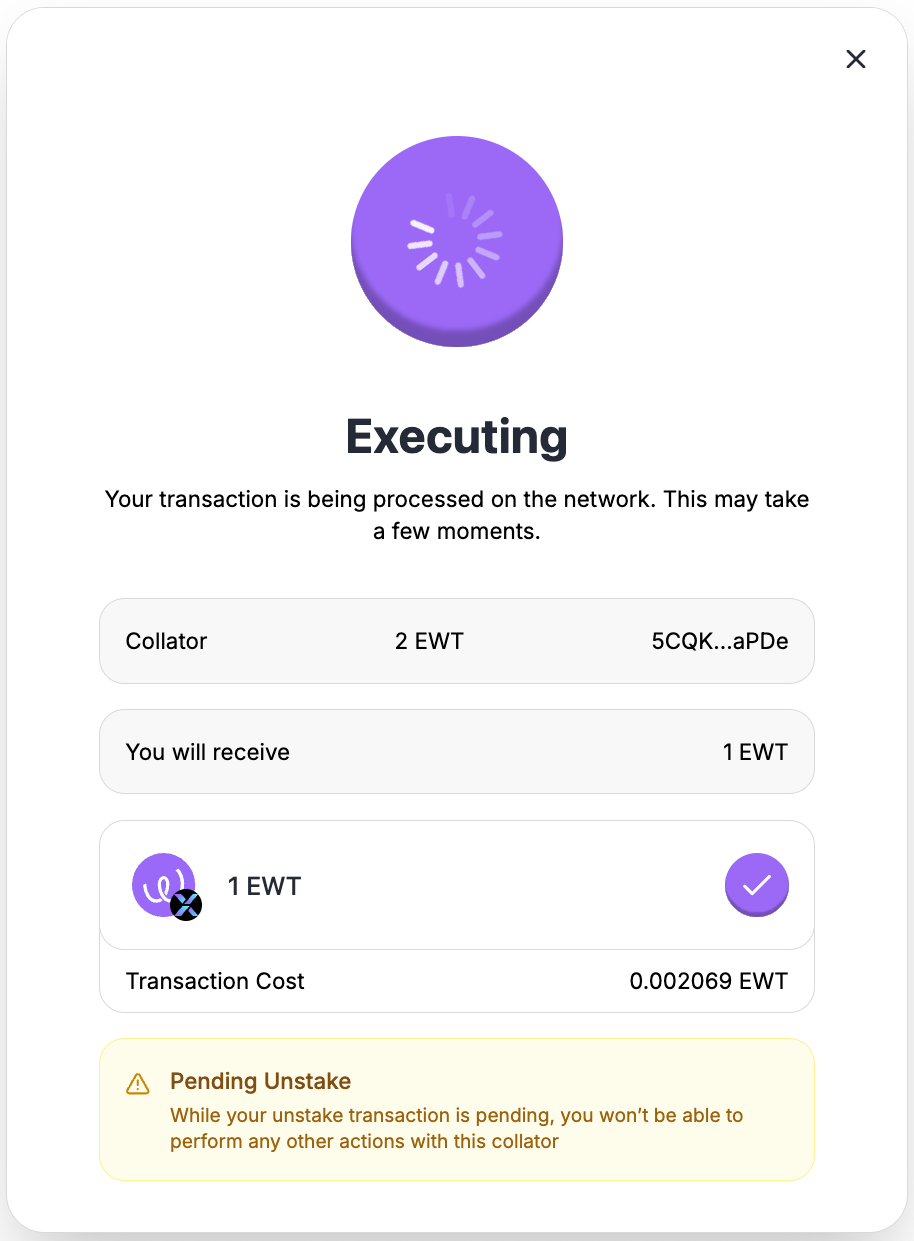
<figure><img src="https://4257445316-files.gitbook.io/~/files/v0/b/gitbook-x-prod.appspot.com/o/spaces%2Fnf3YeoQlQerc93GsC2Me%2Fuploads%2FYsV3HXwIa9rZ56345rtJ%2Fimage.png?alt=media&#x26;token=aab26505-9574-425a-8b6f-a9509994c77c" alt="" width="375"><figcaption><p>Transaction is executing</p></figcaption></figure>

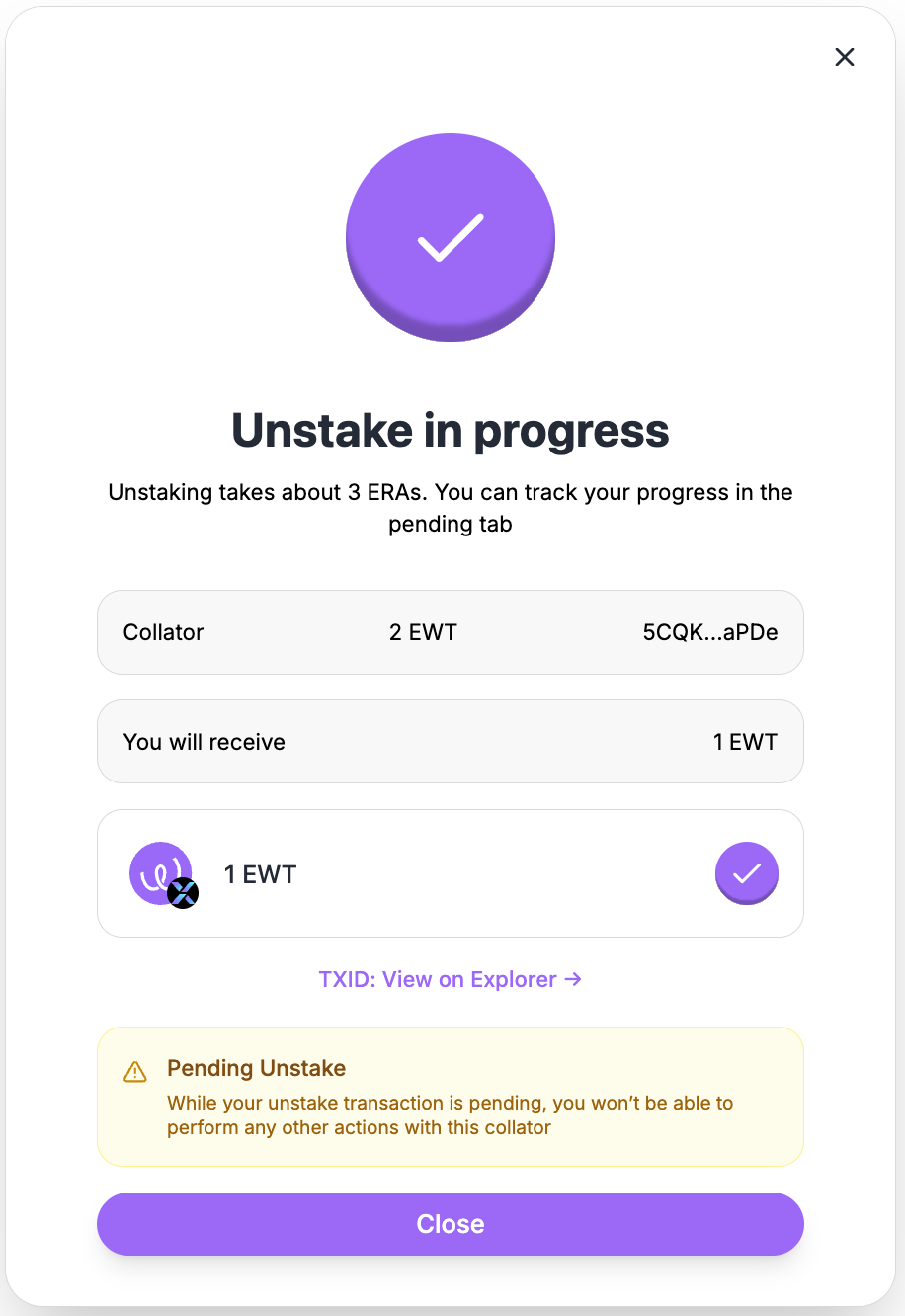
<figure><img src="https://4257445316-files.gitbook.io/~/files/v0/b/gitbook-x-prod.appspot.com/o/spaces%2Fnf3YeoQlQerc93GsC2Me%2Fuploads%2F8FF1k7sp0BEgXgMCYiSZ%2Fimage.png?alt=media&#x26;token=5f676010-2e46-45f4-ac3f-d677eb717236" alt="" width="375"><figcaption><p>Decrease Stake or Unstake is scheduled</p></figcaption></figure>

After successfully executing the transaction, Available to Unstake amount will be updated. The Pending Unstake column in the collators selector will also reflect the amount.

<figure><img src="https://4257445316-files.gitbook.io/~/files/v0/b/gitbook-x-prod.appspot.com/o/spaces%2Fnf3YeoQlQerc93GsC2Me%2Fuploads%2FaaflgHXyAL96xFYo1wfv%2Fimage.png?alt=media&#x26;token=4bf14e6b-bcd9-44e2-a050-29ff2fbde707" alt=""><figcaption><p>Available to Unstake and Pending Unstake amounts are updated</p></figcaption></figure>

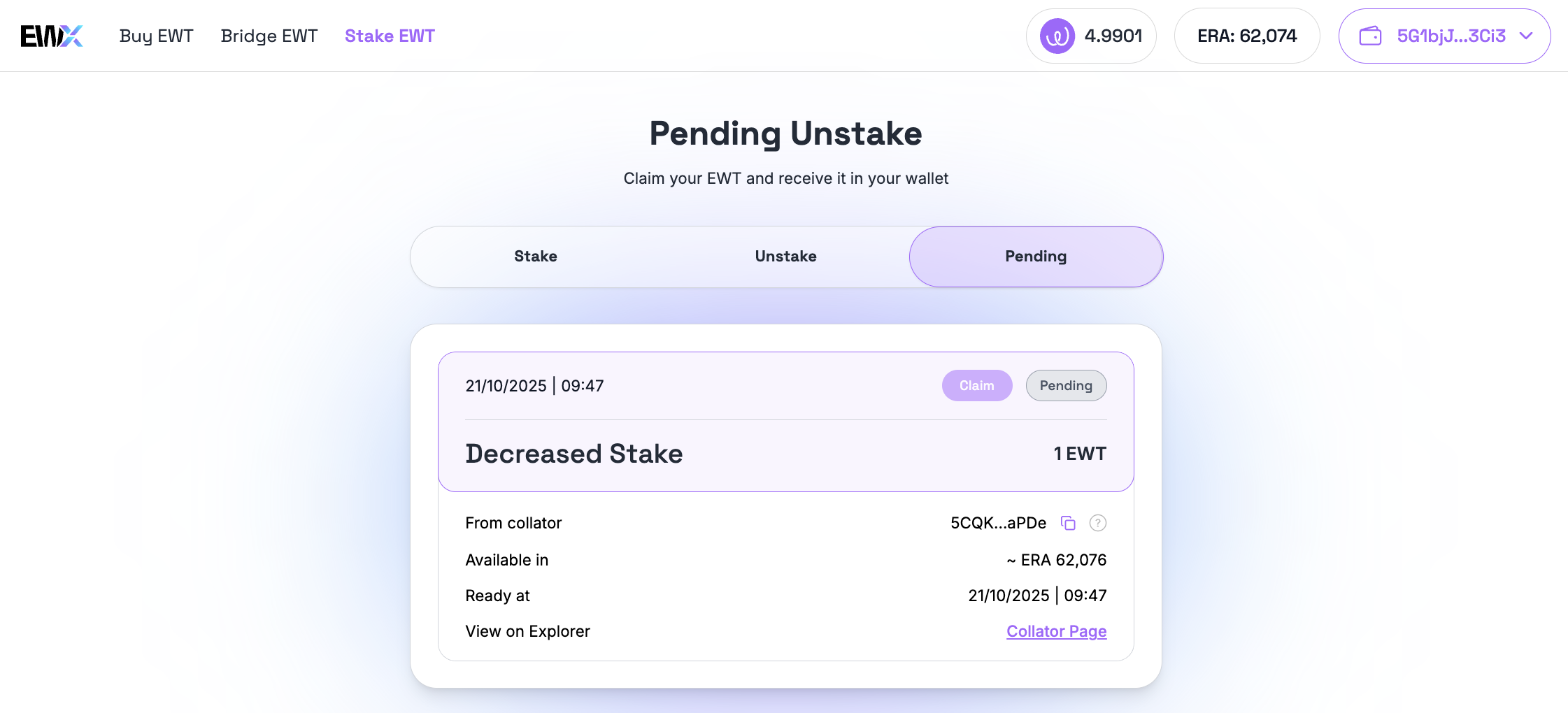
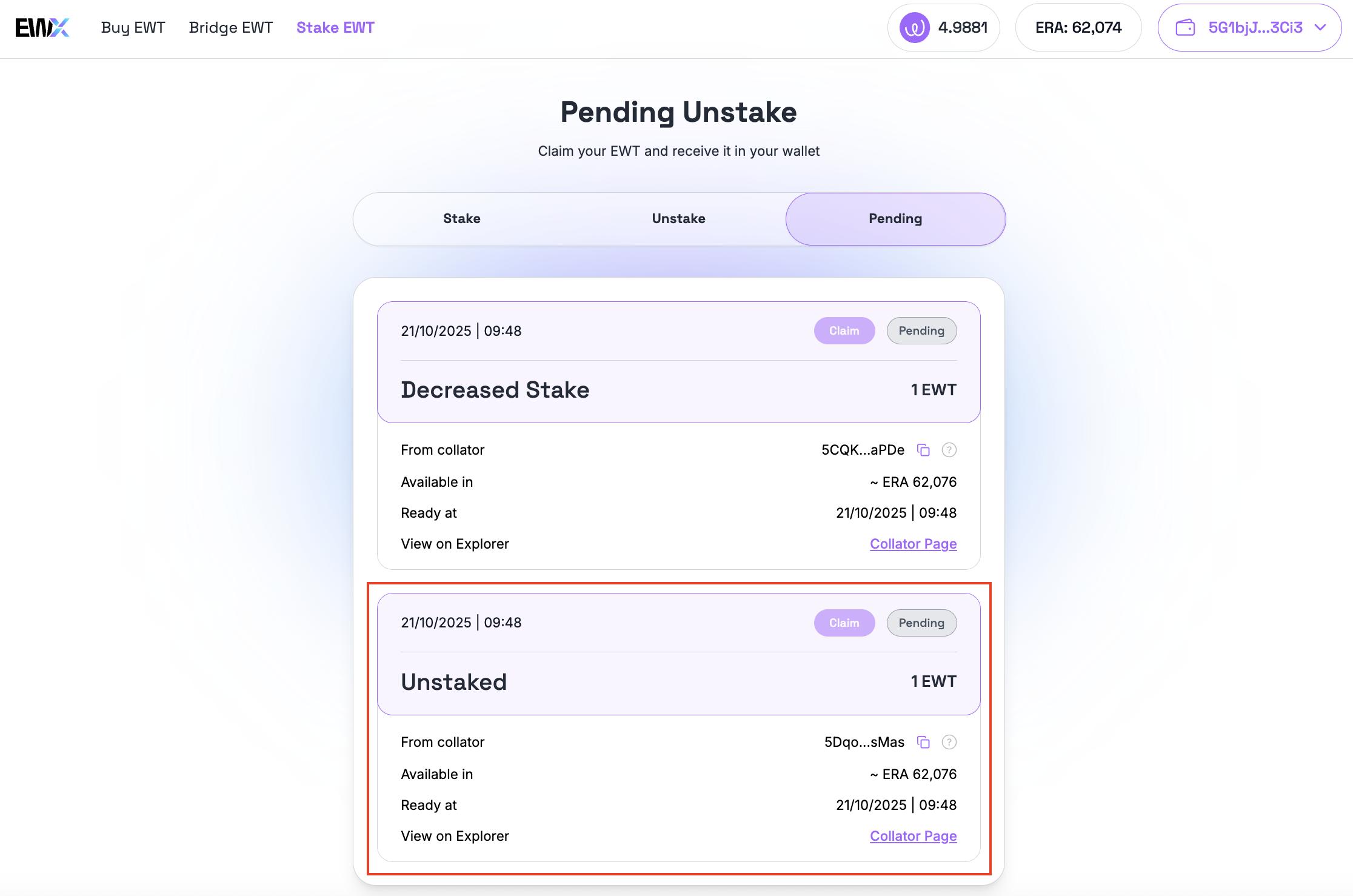
In addition, the transaction will also appear in the "Pending" tab showing further details.

{% hint style="warning" %}
**Pending Unstake**\
While your unstake transaction is pending, you won’t be able to perform any other actions with this collator.
{% endhint %}

{% hint style="success" %}
Currently, it takes around 2 ERAs for a Pending transaction to become "Ready to Claim".
{% endhint %}

<figure><img src="https://4257445316-files.gitbook.io/~/files/v0/b/gitbook-x-prod.appspot.com/o/spaces%2Fnf3YeoQlQerc93GsC2Me%2Fuploads%2FI6hEV4vpwfyAZkgUevpp%2Fimage.png?alt=media&#x26;token=efe841d3-a347-4fc9-b99a-efe9dc911971" alt=""><figcaption><p>Scheduled decrease stake is shown in Pending tab</p></figcaption></figure>

Below is an example when a full unstake is scheduled for a particular collator:

<figure><img src="https://4257445316-files.gitbook.io/~/files/v0/b/gitbook-x-prod.appspot.com/o/spaces%2Fnf3YeoQlQerc93GsC2Me%2Fuploads%2FmrYpTpAkkHx0LMScjTaj%2Fimage.png?alt=media&#x26;token=35072c37-59dc-4e66-b0d4-c17dbc2cbba0" alt=""><figcaption><p>Fully unstake for a specific collator</p></figcaption></figure>