# Linking a worker account to an operator account

Before your worker node is able to cast votes, your worker account needs to be linked to an operator account first. This is a one-time step only and you will not be prompted to link again in the future (unless it's being unlinked).

### Prerequisites

* [x] Connected EWX account
* [x] Connected worker account
* [x] [Subscribed](https://docs-launchpad.energyweb.org/ewx-ecosystem/the-marketplace-app/subscriptions/subscribing-to-a-solution-group) solution group

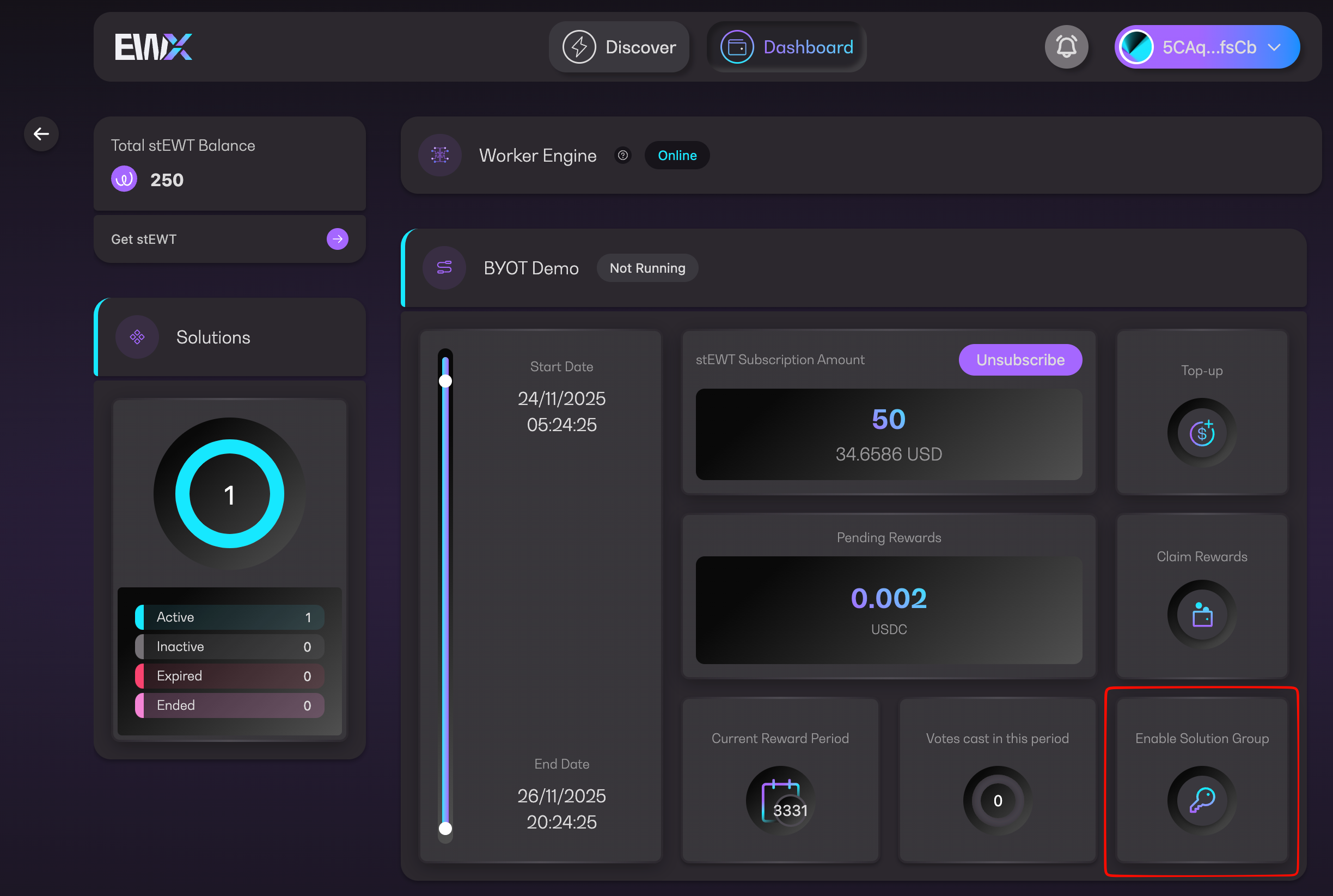
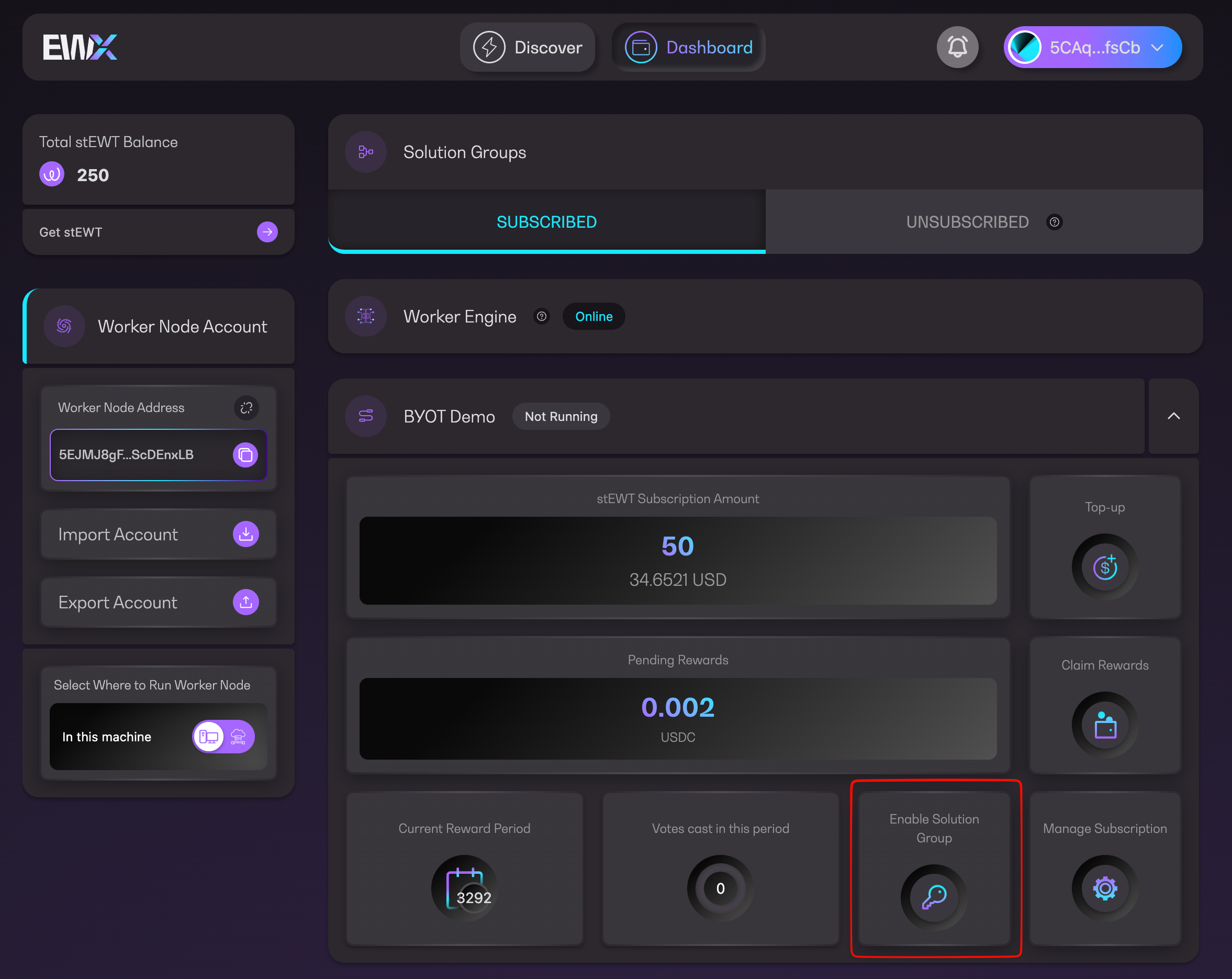
1. Click `Enable Solution Group` either from Dashboard or Manage Subscription page

<figure><img src="https://4257445316-files.gitbook.io/~/files/v0/b/gitbook-x-prod.appspot.com/o/spaces%2Fnf3YeoQlQerc93GsC2Me%2Fuploads%2Fm6TV98HE6MEtOrhOCS0c%2FSCR-20251124-lhjp.png?alt=media&#x26;token=c2a8f52d-6d52-4a5e-b823-884de8633e5d" alt=""><figcaption><p>Enable Solution Group in Dashboard</p></figcaption></figure>

<figure><img src="https://4257445316-files.gitbook.io/~/files/v0/b/gitbook-x-prod.appspot.com/o/spaces%2Fnf3YeoQlQerc93GsC2Me%2Fuploads%2FlFfxX1wG5uqHu3N7xQuo%2FSCR-20251124-llzy.png?alt=media&#x26;token=0888fe16-367d-4647-a07a-777122a6eb80" alt=""><figcaption><p>Enable Solution Group in Manage Subscription</p></figcaption></figure>

2. Read through the important information regarding participating into a worker node network. Click `Continue` to proceed or `Dashboard` to cancel

<figure><img src="https://4257445316-files.gitbook.io/~/files/v0/b/gitbook-x-prod.appspot.com/o/spaces%2Fnf3YeoQlQerc93GsC2Me%2Fuploads%2FVSkTSwPwGc9ZDN39kugy%2Fimage.png?alt=media&#x26;token=0f11a50b-2a2e-4706-aa25-82d7d2b53a99" alt="" width="375"><figcaption><p>Participate into worker node network message</p></figcaption></figure>

3. Click `Continue` to proceed

<figure><img src="https://4257445316-files.gitbook.io/~/files/v0/b/gitbook-x-prod.appspot.com/o/spaces%2Fnf3YeoQlQerc93GsC2Me%2Fuploads%2FEDQNUYkho314Qar9nDWj%2Fimage.png?alt=media&#x26;token=aead916d-c6a6-4bc5-899a-b0b8d03b6422" alt="" width="375"><figcaption><p>Proceed to connect worker account</p></figcaption></figure>

4. Approve the transaction in your wallet

<figure><img src="https://4257445316-files.gitbook.io/~/files/v0/b/gitbook-x-prod.appspot.com/o/spaces%2Fnf3YeoQlQerc93GsC2Me%2Fuploads%2FWRQ5sO1yr928YuAnH4P9%2Fimage.png?alt=media&#x26;token=f34399a1-aeff-4744-8468-0c622f384a0c" alt="" width="375"><figcaption><p>Pending confirmation</p></figcaption></figure>

5. Wait for the transaction to finish execution

<figure><img src="https://4257445316-files.gitbook.io/~/files/v0/b/gitbook-x-prod.appspot.com/o/spaces%2Fnf3YeoQlQerc93GsC2Me%2Fuploads%2FQ6JLoMwdczqm7STjU2pd%2Fimage.png?alt=media&#x26;token=e9d9ee40-bea2-4e65-aff3-926bb35a2b06" alt="" width="375"><figcaption><p>Executing transaction</p></figcaption></figure>

6. Once you see the transaction successful message, your worker account and operator account are now linked :link:

<figure><img src="https://4257445316-files.gitbook.io/~/files/v0/b/gitbook-x-prod.appspot.com/o/spaces%2Fnf3YeoQlQerc93GsC2Me%2Fuploads%2FOU1LvnzmkWxT5cZ6NaEb%2Fimage.png?alt=media&#x26;token=4661088b-1e81-44ee-b6da-bbbba45b4c53" alt="" width="375"><figcaption><p>Link worker transaction successful</p></figcaption></figure>